Increasing Cart Value Without Friction
Year :
2026
Industry :
E-Commerce
Client :
Zepto
Project Duration :
2 weeks
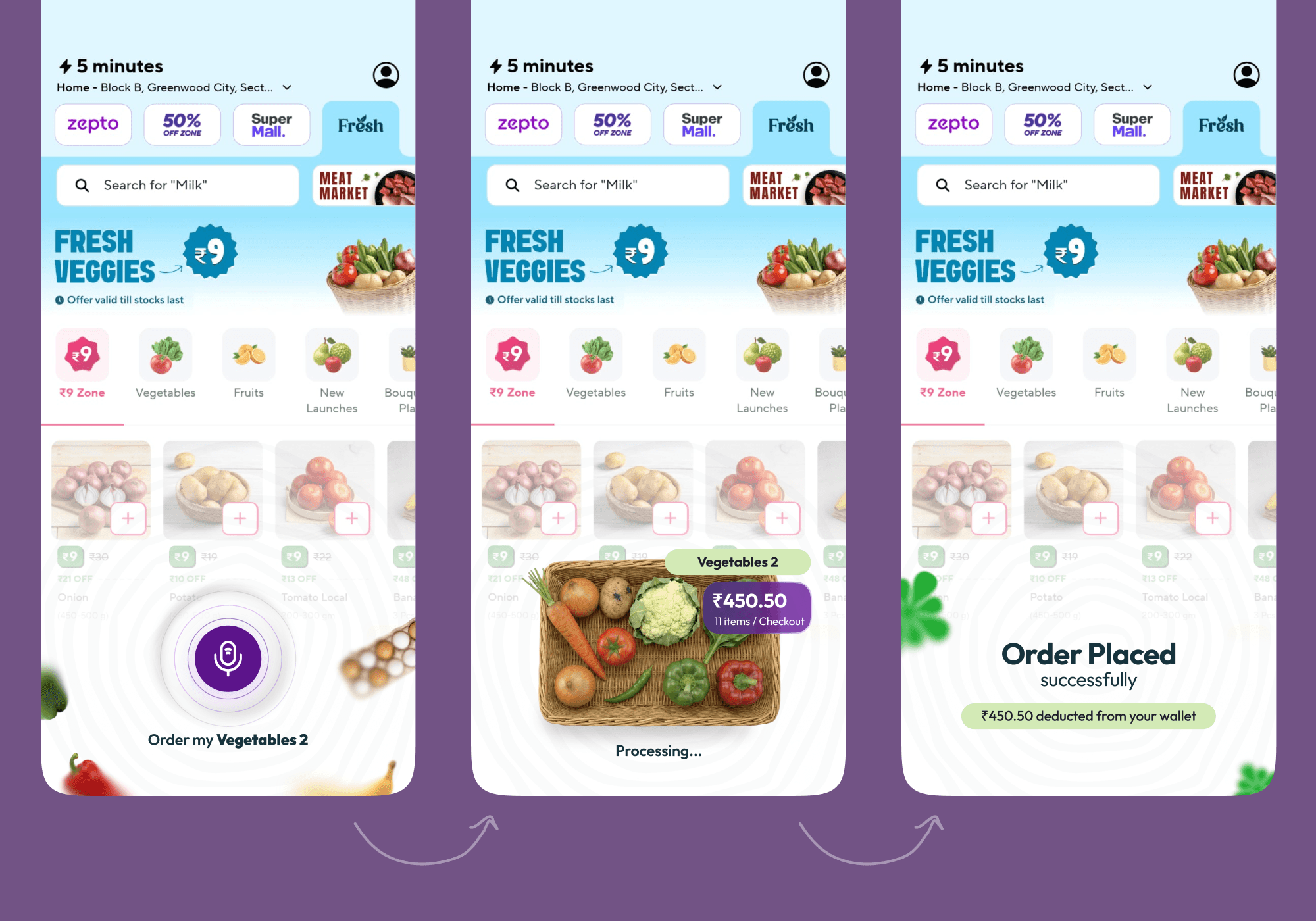
What you’re seeing is a simple voice command placing a full weekly order in seconds. This is my attempt to increase cart value without adding friction.
But why does this problem exist in the first place, and how can something this simple actually solve it?
Problem
As a Zepto user, I use it for instant delivery, and because of that, I often place very small orders. That is the main headache for Zepto and similar e-commerce companies because users simply do not place large orders.
To understand this better, Zepto spends almost the same delivery cost on every order, whether the order is small or large. When users place small orders, the delivery cost becomes high for the company.
To solve this, Zepto adds a minimum order value barrier to push users to build a certain cart amount. But this creates friction.
Users feel forced to add items they do not really need, delay ordering, or sometimes drop off completely.
"Users want to order fast. Zepto wants bigger carts. Right now, neither is happening"
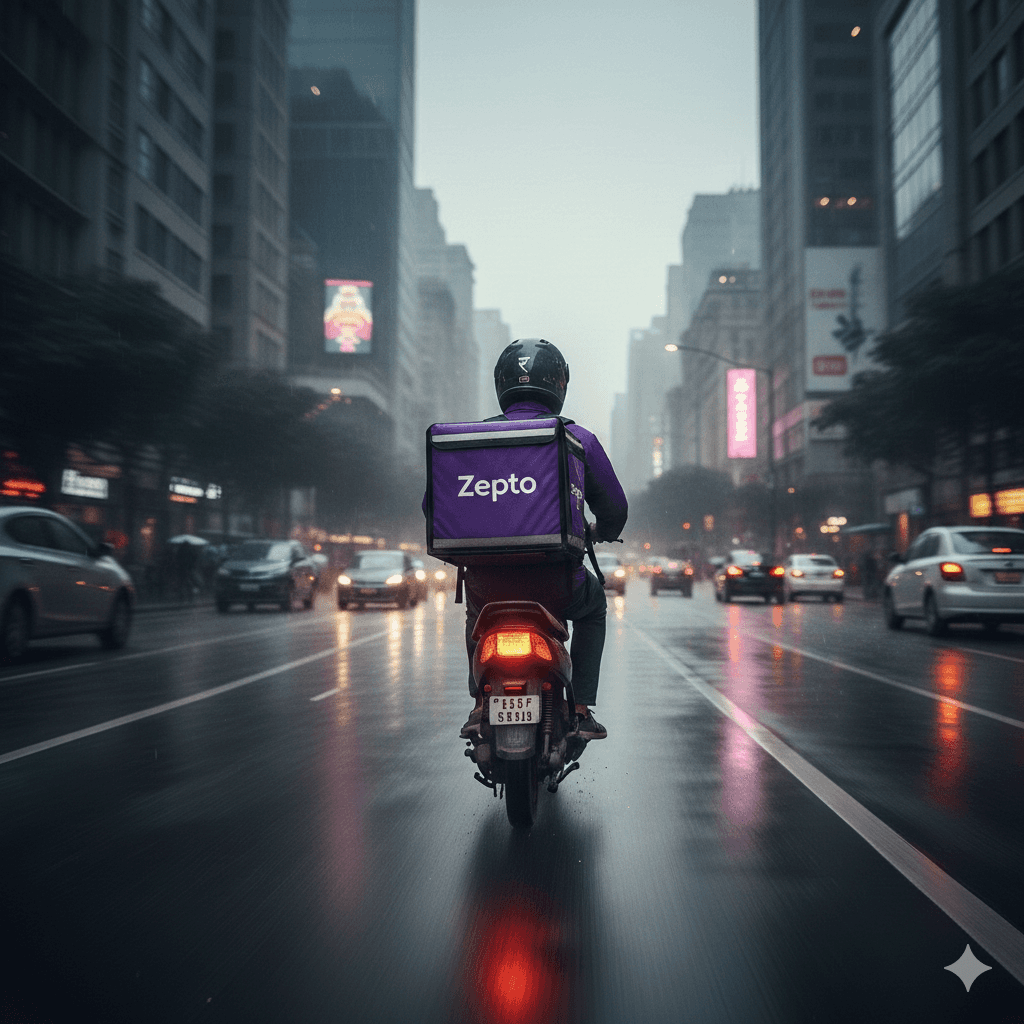
challenge
How to increase cart value without increasing friction?
Solution
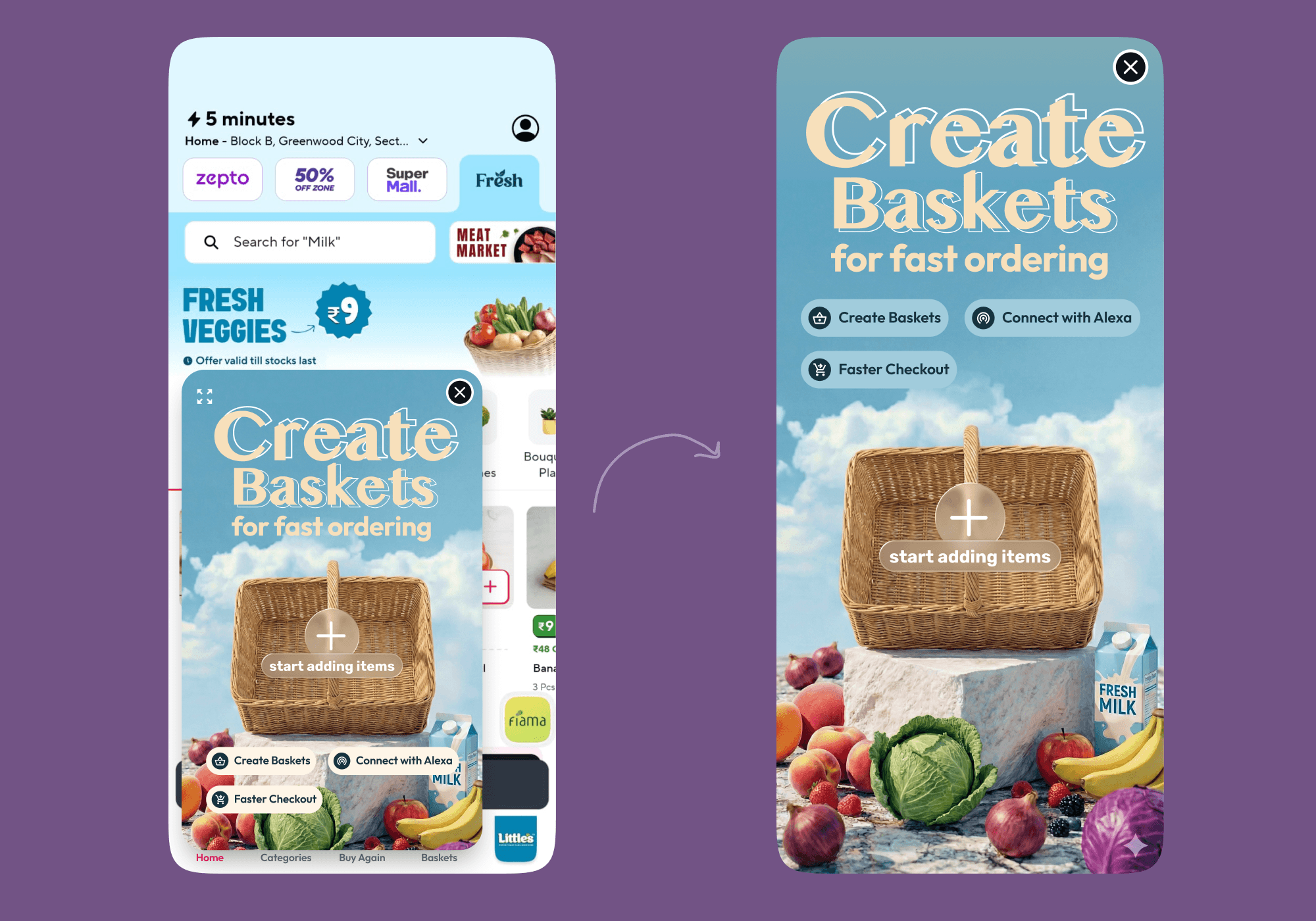
Personal Baskets. Like "Vegetables – Weekly." "Medicines – Parents." "Fruits – 3 Days."
Instead of pushing users to increase their cart with discounts or nudges, the idea is to help them create their own baskets and make ordering extremely simple. Each basket can contain as many items as the user wants and can be as big as they need.
Next time they open the app, one tap places the whole order. No searching. No thinking. No friction.
People remember and continue using products not because they offer discounts, but because they make everyday actions easier.
What Makes "personal Basket" Different from "Reorder"
Reorder shows you what you bought. Baskets show you what you need.
Reorder is passive, it waits for you to remember. Baskets are intentional, the user builds them with purpose, which means higher trust, higher completion rate, and a habit that compounds every week.
How Baskets Grow Without Being Pushed
The biggest bottleneck in this entire idea?
If user builds a small basket.
Two items. ₹90. And now they're placing that same ₹90 basket every single day with one tap, which is exactly what this feature enables. The habit formed. The friction is gone. But the cart value problem is still there.
Adding a minimum basket value brings back the same wall we removed.
So the real question is not how to stop users from making small baskets. It is how to make users want to build bigger ones on their own.
The answer is a layered design system that introduces the right psychological trigger at the right moment
Stage 1 — Let the habit form. Do nothing.
Orders 1–4 should feel completely frictionless. A small basket is a win, the user is ordering, the routine is starting. Any design intervention here breaks the thing we are trying to build.
Stage 2 — Order 5. Show the mirror.
Zeigarnik Effect — people remember and act on things that feel unfinished or unresolved.
One quiet line appears on the home screen "You have ordered this basket 5 times this week."
No CTA. No prompt. The user does the math themselves. Ordering every single day when one bigger order could cover the week suddenly feels inefficient and they noticed it on their own.
Stage 3 — Order 6. Introduce the quiet loss.
Loss Aversion — people are more motivated by the fear of losing something than by the hope of gaining something.
Inside the basket, one line "This basket lasts about 1 day. You will need to reorder tomorrow."
The user who now loves one-tap ordering reads this with a completely different lens. They are not being asked to add items. They are realising they are about to lose the convenience they just built. That is enough.
Stage 4 — Order 8 onwards. The incomplete bar.
Endowed Progress — when people see partial progress toward a goal, they feel compelled to complete it.
Inside basket edit, a single quiet indicator "2 of 7 days covered"
No price. No threshold. Just incompleteness. The user adds items not because they were asked but because leaving it at 2 of 7 feels unresolved. The design creates the goal. The user chases it.
We do not push on day one. We let the habit form first. Then, at exactly the right moment, the design surfaces the right trigger and the user grows the basket entirely on their own terms.
Taking It Further — Do Not Make Users Build. Build For Them
The Habit Engine works. But it still starts from one assumption that the user will build a reasonably sized basket on their own.
Most will not. An empty basket is a blank page. And blank pages stay small because every item requires a decision.
The smarter move is to change the starting point entirely but carefully.
Step 1 — Ask intent first.
Before pre-filling anything, the app asks one simple question "What is this basket for? Vegetables · Fruits · Medicines · Daily Essentials"
One tap. That is it. Now the app knows exactly what the user is trying to solve for.
Step 2 — Pre-fill from their own history, within that category.
The app pulls from the user's last 10–15 orders — but only items that match the chosen category. If the user picked Vegetables, only vegetables they have ordered before appear. Nothing unfamiliar. Nothing random.
Example: "Based on your recent orders, here is your Weekly Vegetables basket — 8 items, covers 7 days. Remove anything you do not need."
The user starts at ₹480. They remove one item they no longer need. Basket saved at ₹420.
Three to four times larger than what they would have built from scratch without a single prompt, discount, or minimum value barrier.
Psychology: Default Bias — people accept what is placed in front of them far more than they build from nothing. But defaults only work when they feel personally relevant. A random pre-fill gets cleared. A familiar, category-matched pre-fill feels like the app just understood you.
The user still has full control. But the starting point is no longer zero and the basket never feels foreign because every item in it is something they have already bought before.
Voice Ordering — The Fastest Checkout
In-App Voice
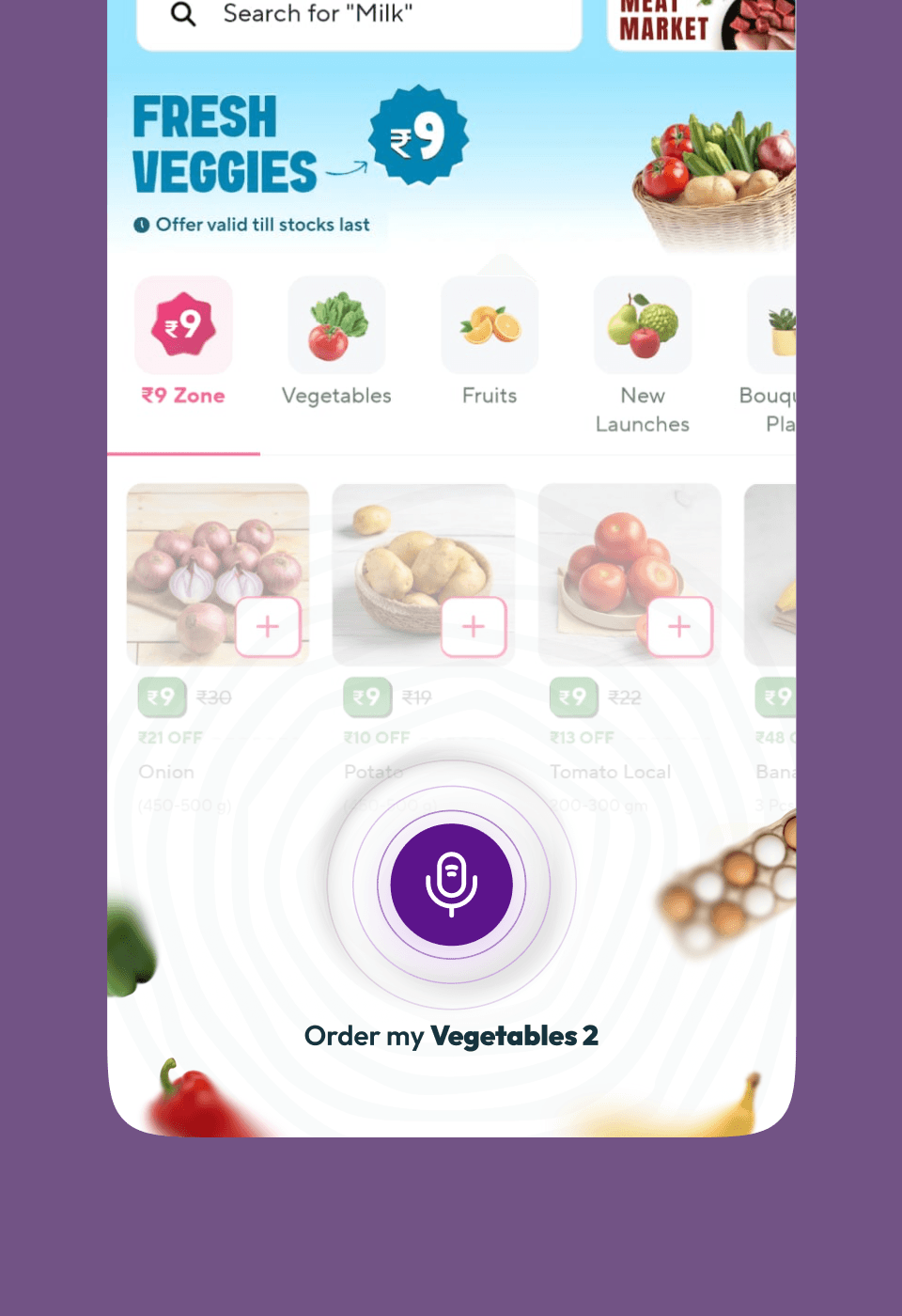
Because every basket has a specific, user-defined name — "Weekly Vegetables," "Medicines – Parents" — the app understands exactly what you mean the moment you say it.
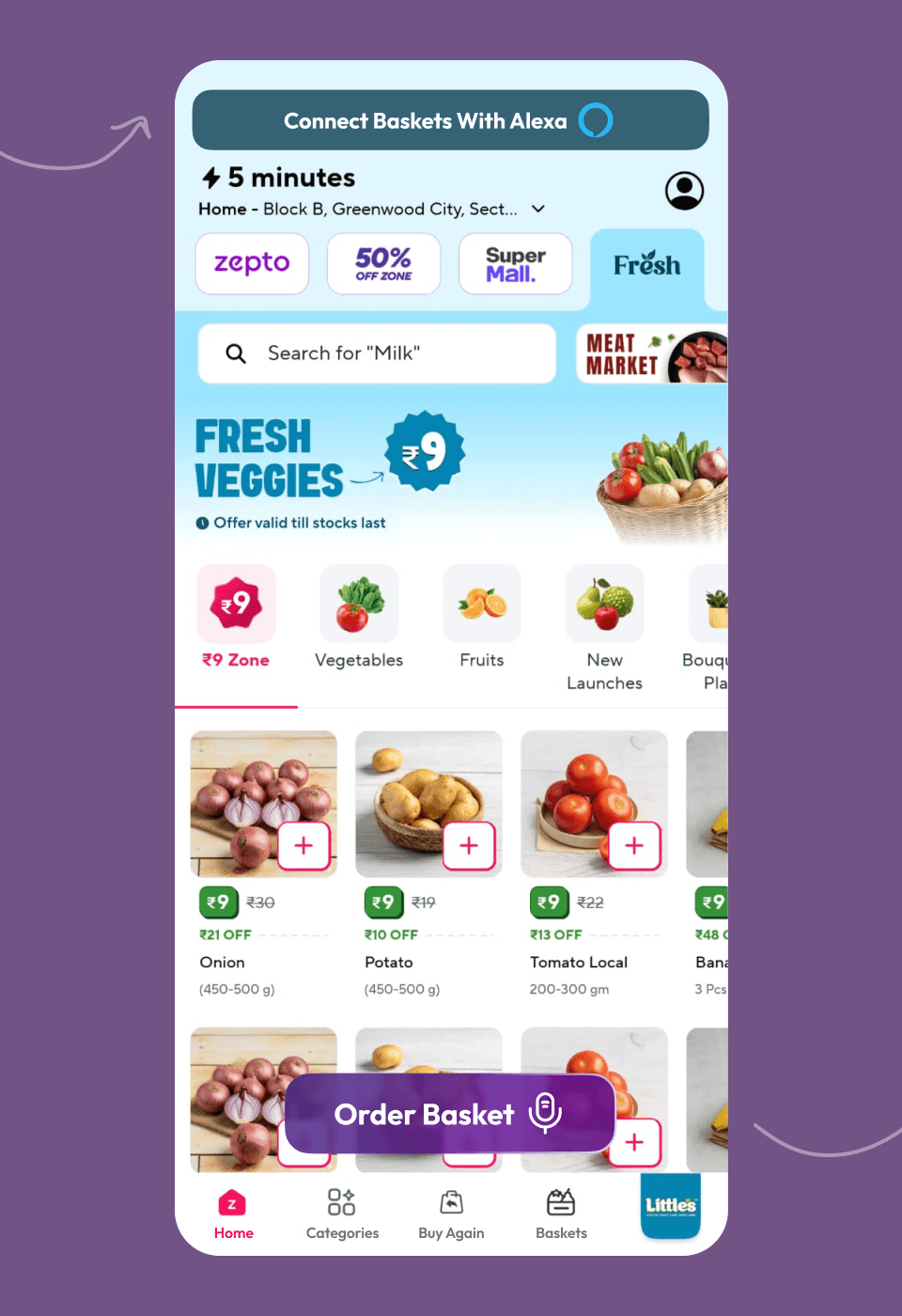
Open the app, tap the mic, say the basket name. Order placed. No scrolling, no searching, no cart building. The named basket is what makes this accurate
Alexa / Google Home Integration
Connect your baskets to Alexa or Google Home. That's it. No phone unlocked. No app opened. No screen touched. The basket triggers, Zepto confirms, order is placed.
"Alexa, order my weekly vegetables from Zepto."
It's the kind of thing that makes an app feel irreplaceable.
Expected Impact — What This Actually Moves
In-App Voice
Because every basket has a specific, user-defined name — "Weekly Vegetables," "Medicines – Parents" — the app understands exactly what you mean the moment you say it.
Open the app, tap the mic, say the basket name. Order placed. No scrolling, no searching, no cart building. The named basket is what makes this accurate
Alexa / Google Home Integration
Connect your baskets to Alexa or Google Home. That's it. No phone unlocked. No app opened. No screen touched. The basket triggers, Zepto confirms, order is placed.
"Alexa, order my weekly vegetables from Zepto."
It's the kind of thing that makes an app feel irreplaceable.
Increasing Cart Value Without Friction
Year :
2026
Industry :
E-Commerce
Client :
Zepto
Project Duration :
2 weeks
What you’re seeing is a simple voice command placing a full weekly order in seconds. This is my attempt to increase cart value without adding friction.
But why does this problem exist in the first place, and how can something this simple actually solve it?
Problem
As a Zepto user, I use it for instant delivery, and because of that, I often place very small orders. That is the main headache for Zepto and similar e-commerce companies because users simply do not place large orders.
To understand this better, Zepto spends almost the same delivery cost on every order, whether the order is small or large. When users place small orders, the delivery cost becomes high for the company.
To solve this, Zepto adds a minimum order value barrier to push users to build a certain cart amount. But this creates friction.
Users feel forced to add items they do not really need, delay ordering, or sometimes drop off completely.
"Users want to order fast. Zepto wants bigger carts. Right now, neither is happening"
challenge
How to increase cart value without increasing friction?
Solution
Personal Baskets. Like "Vegetables – Weekly." "Medicines – Parents." "Fruits – 3 Days."
Instead of pushing users to increase their cart with discounts or nudges, the idea is to help them create their own baskets and make ordering extremely simple. Each basket can contain as many items as the user wants and can be as big as they need.
Next time they open the app, one tap places the whole order. No searching. No thinking. No friction.
People remember and continue using products not because they offer discounts, but because they make everyday actions easier.
What Makes "personal Basket" Different from "Reorder"
Reorder shows you what you bought. Baskets show you what you need.
Reorder is passive, it waits for you to remember. Baskets are intentional, the user builds them with purpose, which means higher trust, higher completion rate, and a habit that compounds every week.
How Baskets Grow Without Being Pushed
The biggest bottleneck in this entire idea?
If user builds a small basket.
Two items. ₹90. And now they're placing that same ₹90 basket every single day with one tap, which is exactly what this feature enables. The habit formed. The friction is gone. But the cart value problem is still there.
Adding a minimum basket value brings back the same wall we removed.
So the real question is not how to stop users from making small baskets. It is how to make users want to build bigger ones on their own.
The answer is a layered design system that introduces the right psychological trigger at the right moment
Stage 1 — Let the habit form. Do nothing.
Orders 1–4 should feel completely frictionless. A small basket is a win, the user is ordering, the routine is starting. Any design intervention here breaks the thing we are trying to build.
Stage 2 — Order 5. Show the mirror.
Zeigarnik Effect — people remember and act on things that feel unfinished or unresolved.
One quiet line appears on the home screen "You have ordered this basket 5 times this week."
No CTA. No prompt. The user does the math themselves. Ordering every single day when one bigger order could cover the week suddenly feels inefficient and they noticed it on their own.
Stage 3 — Order 6. Introduce the quiet loss.
Loss Aversion — people are more motivated by the fear of losing something than by the hope of gaining something.
Inside the basket, one line "This basket lasts about 1 day. You will need to reorder tomorrow."
The user who now loves one-tap ordering reads this with a completely different lens. They are not being asked to add items. They are realising they are about to lose the convenience they just built. That is enough.
Stage 4 — Order 8 onwards. The incomplete bar.
Endowed Progress — when people see partial progress toward a goal, they feel compelled to complete it.
Inside basket edit, a single quiet indicator "2 of 7 days covered"
No price. No threshold. Just incompleteness. The user adds items not because they were asked but because leaving it at 2 of 7 feels unresolved. The design creates the goal. The user chases it.
We do not push on day one. We let the habit form first. Then, at exactly the right moment, the design surfaces the right trigger and the user grows the basket entirely on their own terms.
Taking It Further — Do Not Make Users Build. Build For Them
The Habit Engine works. But it still starts from one assumption that the user will build a reasonably sized basket on their own.
Most will not. An empty basket is a blank page. And blank pages stay small because every item requires a decision.
The smarter move is to change the starting point entirely but carefully.
Step 1 — Ask intent first.
Before pre-filling anything, the app asks one simple question "What is this basket for? Vegetables · Fruits · Medicines · Daily Essentials"
One tap. That is it. Now the app knows exactly what the user is trying to solve for.
Step 2 — Pre-fill from their own history, within that category.
The app pulls from the user's last 10–15 orders — but only items that match the chosen category. If the user picked Vegetables, only vegetables they have ordered before appear. Nothing unfamiliar. Nothing random.
Example: "Based on your recent orders, here is your Weekly Vegetables basket — 8 items, covers 7 days. Remove anything you do not need."
The user starts at ₹480. They remove one item they no longer need. Basket saved at ₹420.
Three to four times larger than what they would have built from scratch without a single prompt, discount, or minimum value barrier.
Psychology: Default Bias — people accept what is placed in front of them far more than they build from nothing. But defaults only work when they feel personally relevant. A random pre-fill gets cleared. A familiar, category-matched pre-fill feels like the app just understood you.
The user still has full control. But the starting point is no longer zero and the basket never feels foreign because every item in it is something they have already bought before.
Voice Ordering — The Fastest Checkout
In-App Voice
Because every basket has a specific, user-defined name — "Weekly Vegetables," "Medicines – Parents" — the app understands exactly what you mean the moment you say it.
Open the app, tap the mic, say the basket name. Order placed. No scrolling, no searching, no cart building. The named basket is what makes this accurate
Alexa / Google Home Integration
Connect your baskets to Alexa or Google Home. That's it. No phone unlocked. No app opened. No screen touched. The basket triggers, Zepto confirms, order is placed.
"Alexa, order my weekly vegetables from Zepto."
It's the kind of thing that makes an app feel irreplaceable.
Expected Impact — What This Actually Moves
In-App Voice
Because every basket has a specific, user-defined name — "Weekly Vegetables," "Medicines – Parents" — the app understands exactly what you mean the moment you say it.
Open the app, tap the mic, say the basket name. Order placed. No scrolling, no searching, no cart building. The named basket is what makes this accurate
Alexa / Google Home Integration
Connect your baskets to Alexa or Google Home. That's it. No phone unlocked. No app opened. No screen touched. The basket triggers, Zepto confirms, order is placed.
"Alexa, order my weekly vegetables from Zepto."
It's the kind of thing that makes an app feel irreplaceable.
Increasing Cart Value Without Friction
Year :
2026
Industry :
E-Commerce
Client :
Zepto
Project Duration :
2 weeks
What you’re seeing is a simple voice command placing a full weekly order in seconds. This is my attempt to increase cart value without adding friction.
But why does this problem exist in the first place, and how can something this simple actually solve it?
Problem
As a Zepto user, I use it for instant delivery, and because of that, I often place very small orders. That is the main headache for Zepto and similar e-commerce companies because users simply do not place large orders.
To understand this better, Zepto spends almost the same delivery cost on every order, whether the order is small or large. When users place small orders, the delivery cost becomes high for the company.
To solve this, Zepto adds a minimum order value barrier to push users to build a certain cart amount. But this creates friction.
Users feel forced to add items they do not really need, delay ordering, or sometimes drop off completely.
"Users want to order fast. Zepto wants bigger carts. Right now, neither is happening"
challenge
How to increase cart value without increasing friction?
Solution
Personal Baskets. Like "Vegetables – Weekly." "Medicines – Parents." "Fruits – 3 Days."
Instead of pushing users to increase their cart with discounts or nudges, the idea is to help them create their own baskets and make ordering extremely simple. Each basket can contain as many items as the user wants and can be as big as they need.
Next time they open the app, one tap places the whole order. No searching. No thinking. No friction.
People remember and continue using products not because they offer discounts, but because they make everyday actions easier.
What Makes "personal Basket" Different from "Reorder"
Reorder shows you what you bought. Baskets show you what you need.
Reorder is passive, it waits for you to remember. Baskets are intentional, the user builds them with purpose, which means higher trust, higher completion rate, and a habit that compounds every week.
How Baskets Grow Without Being Pushed
The biggest bottleneck in this entire idea?
If user builds a small basket.
Two items. ₹90. And now they're placing that same ₹90 basket every single day with one tap, which is exactly what this feature enables. The habit formed. The friction is gone. But the cart value problem is still there.
Adding a minimum basket value brings back the same wall we removed.
So the real question is not how to stop users from making small baskets. It is how to make users want to build bigger ones on their own.
The answer is a layered design system that introduces the right psychological trigger at the right moment
Stage 1 — Let the habit form. Do nothing.
Orders 1–4 should feel completely frictionless. A small basket is a win, the user is ordering, the routine is starting. Any design intervention here breaks the thing we are trying to build.
Stage 2 — Order 5. Show the mirror.
Zeigarnik Effect — people remember and act on things that feel unfinished or unresolved.
One quiet line appears on the home screen "You have ordered this basket 5 times this week."
No CTA. No prompt. The user does the math themselves. Ordering every single day when one bigger order could cover the week suddenly feels inefficient and they noticed it on their own.
Stage 3 — Order 6. Introduce the quiet loss.
Loss Aversion — people are more motivated by the fear of losing something than by the hope of gaining something.
Inside the basket, one line "This basket lasts about 1 day. You will need to reorder tomorrow."
The user who now loves one-tap ordering reads this with a completely different lens. They are not being asked to add items. They are realising they are about to lose the convenience they just built. That is enough.
Stage 4 — Order 8 onwards. The incomplete bar.
Endowed Progress — when people see partial progress toward a goal, they feel compelled to complete it.
Inside basket edit, a single quiet indicator "2 of 7 days covered"
No price. No threshold. Just incompleteness. The user adds items not because they were asked but because leaving it at 2 of 7 feels unresolved. The design creates the goal. The user chases it.
We do not push on day one. We let the habit form first. Then, at exactly the right moment, the design surfaces the right trigger and the user grows the basket entirely on their own terms.
Taking It Further — Do Not Make Users Build. Build For Them
The Habit Engine works. But it still starts from one assumption that the user will build a reasonably sized basket on their own.
Most will not. An empty basket is a blank page. And blank pages stay small because every item requires a decision.
The smarter move is to change the starting point entirely but carefully.
Step 1 — Ask intent first.
Before pre-filling anything, the app asks one simple question "What is this basket for? Vegetables · Fruits · Medicines · Daily Essentials"
One tap. That is it. Now the app knows exactly what the user is trying to solve for.
Step 2 — Pre-fill from their own history, within that category.
The app pulls from the user's last 10–15 orders — but only items that match the chosen category. If the user picked Vegetables, only vegetables they have ordered before appear. Nothing unfamiliar. Nothing random.
Example: "Based on your recent orders, here is your Weekly Vegetables basket — 8 items, covers 7 days. Remove anything you do not need."
The user starts at ₹480. They remove one item they no longer need. Basket saved at ₹420.
Three to four times larger than what they would have built from scratch without a single prompt, discount, or minimum value barrier.
Psychology: Default Bias — people accept what is placed in front of them far more than they build from nothing. But defaults only work when they feel personally relevant. A random pre-fill gets cleared. A familiar, category-matched pre-fill feels like the app just understood you.
The user still has full control. But the starting point is no longer zero and the basket never feels foreign because every item in it is something they have already bought before.
Voice Ordering — The Fastest Checkout
In-App Voice
Because every basket has a specific, user-defined name — "Weekly Vegetables," "Medicines – Parents" — the app understands exactly what you mean the moment you say it.
Open the app, tap the mic, say the basket name. Order placed. No scrolling, no searching, no cart building. The named basket is what makes this accurate
Alexa / Google Home Integration
Connect your baskets to Alexa or Google Home. That's it. No phone unlocked. No app opened. No screen touched. The basket triggers, Zepto confirms, order is placed.
"Alexa, order my weekly vegetables from Zepto."
It's the kind of thing that makes an app feel irreplaceable.
Expected Impact — What This Actually Moves
In-App Voice
Because every basket has a specific, user-defined name — "Weekly Vegetables," "Medicines – Parents" — the app understands exactly what you mean the moment you say it.
Open the app, tap the mic, say the basket name. Order placed. No scrolling, no searching, no cart building. The named basket is what makes this accurate
Alexa / Google Home Integration
Connect your baskets to Alexa or Google Home. That's it. No phone unlocked. No app opened. No screen touched. The basket triggers, Zepto confirms, order is placed.
"Alexa, order my weekly vegetables from Zepto."
It's the kind of thing that makes an app feel irreplaceable.