UX Bites
Nobody has time to read every designer's case study, so I'm not writing one. Just real UX decisions from real projects, no fluff, no BS — and if something clicks, we can discuss in detail.
1.
Banner strip
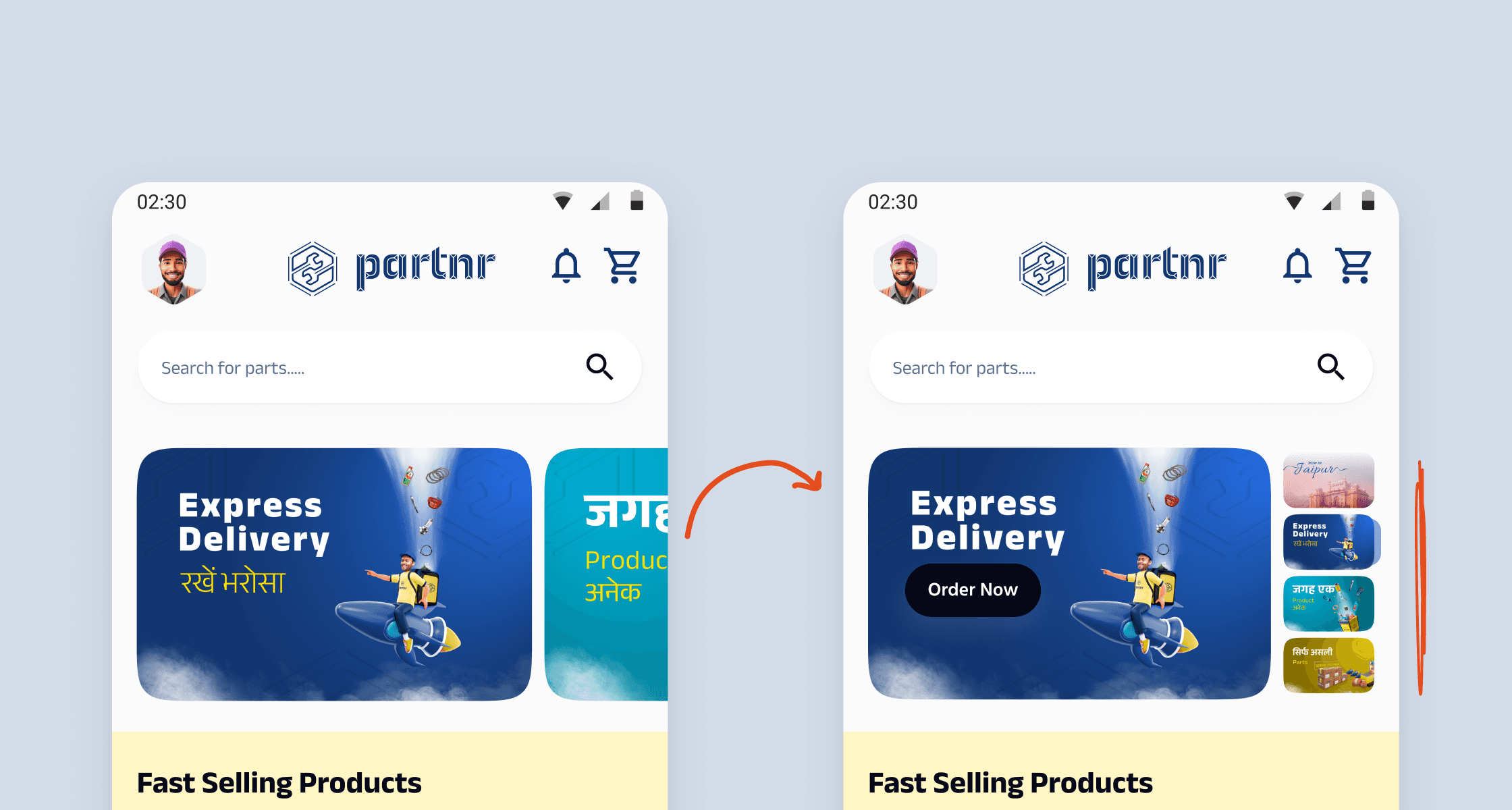
I replaced the horizontal banner carousel with a thumbnail strip on the right. Tap any thumbnail, and it expands on the left, no swiping needed.
I replaced the horizontal banner carousel with a thumbnail strip on the right. Tap any thumbnail, and it expands on the left, no swiping needed.
I replaced the horizontal banner carousel with a thumbnail strip on the right. Tap any thumbnail, and it expands on the left, no swiping needed.
More context
With a carousel, most users never go past the first banner.
The thumbnail strip makes the full set visible upfront. Mechanics started noticing offers they would have completely missed before banner taps went up by +22% and contributed to a +1.1% GMV bump.
UX Psychology
This leans on the Von Restorff effect. When all options are visible at once, each one has a fair chance of standing out, rather than only the first getting all the attention.
2.
The icon nobody could find
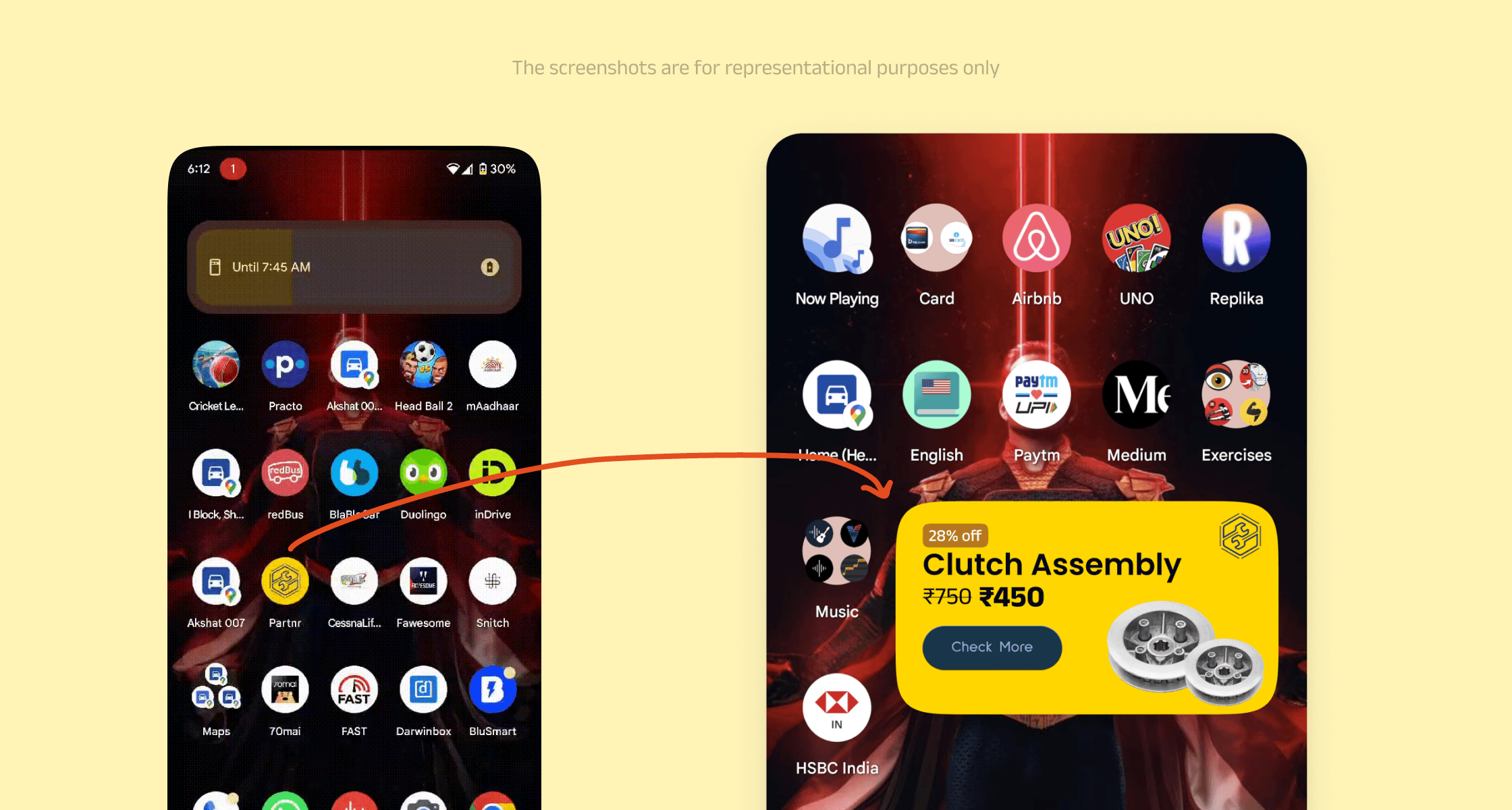
Mechanics have chaotic home screens, Partnr's app icon was buried in there with dozens of others. I replaced it with a home screen widget
Mechanics have chaotic home screens, Partnr's app icon was buried in there with dozens of others. I replaced it with a home screen widget
Mechanics have chaotic home screens, Partnr's app icon was buried in there with dozens of others. I replaced it with a home screen widget
More context
For mechanics, finding the app icon was a conscious effort, dozens of icons, all roughly the same size and shape, competing for the same attention.
The widget skipped that entirely. It showed live part prices, right there on the home screen without them opening anything. Partnr went from something they had to find, to something they couldn't ignore.
Retention improved by +14% and GMV grew by +2.4%.
UX Psychology
This is the mere exposure effect at work. The more you see something, the more familiar and trustworthy it feels.
3.
Scan, don't search
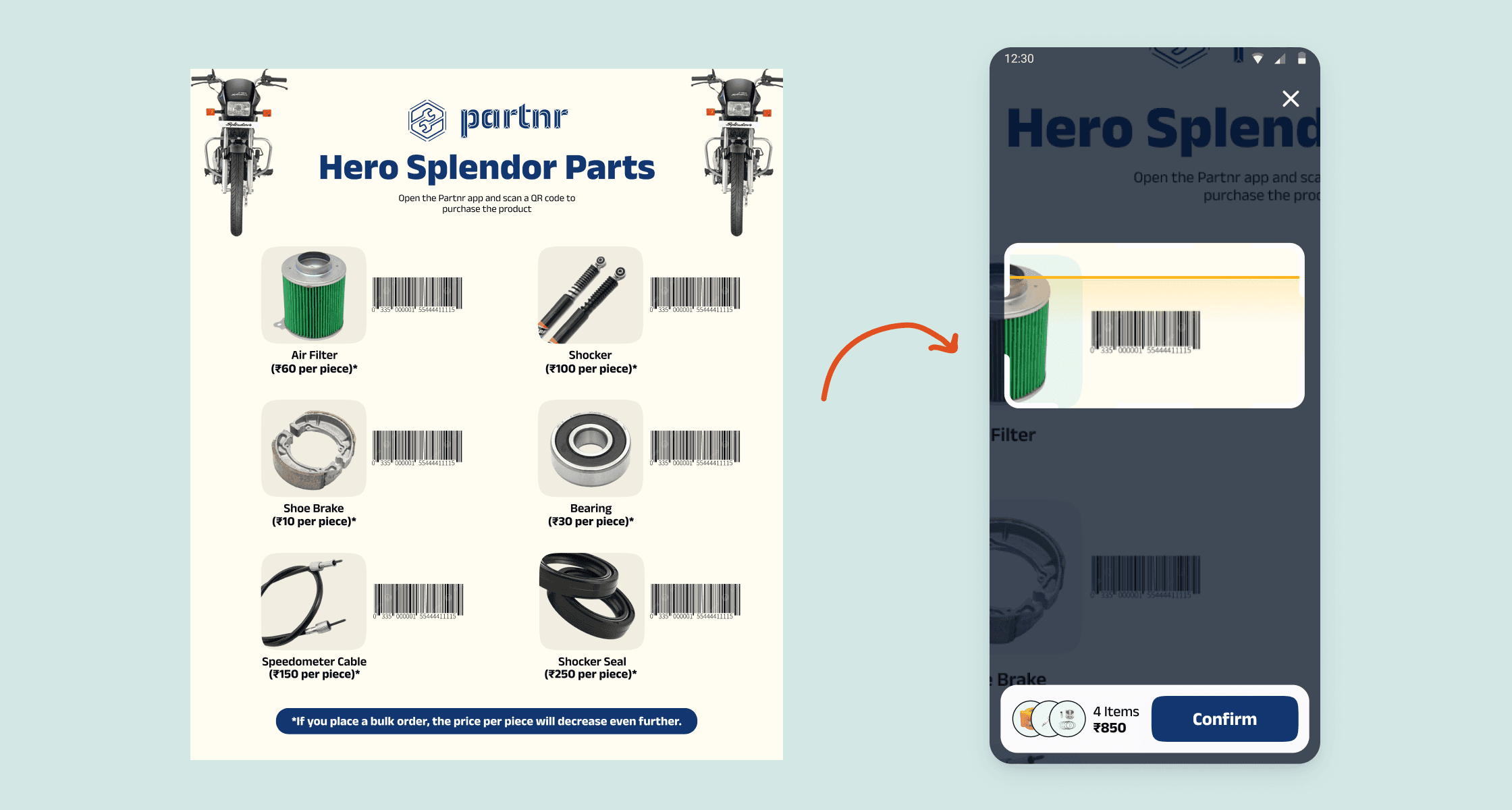
I designed bike specific barcode sheets and placed them inside mechanic workshops. Scanning any barcode through the Partnr app instantly adds that part to the cart, ready to order in seconds.
I designed bike specific barcode sheets and placed them inside mechanic workshops. Scanning any barcode through the Partnr app instantly adds that part to the cart, ready to order in seconds.
I designed bike specific barcode sheets and placed them inside mechanic workshops. Scanning any barcode through the Partnr app instantly adds that part to the cart, ready to order in seconds.
More context
During research I found that most mechanics work on one or two specific bike models depending on their area. They know exactly which parts they need and were just calling their supplier to place orders.
The barcode sheet matched that mental model. It lived on their workshop wall, always visible, with every frequently needed part right there. No searching through the app, no scrolling through categories, just scan and confirm.
Order time reduced by -18% and GMV grew by +8.6%.
UX Psychology
This is reducing cognitive load by removing the need to recall and search. The sheet did the memory work for them, mechanics just had to point and scan.
4.
CTA hiding in plain sight
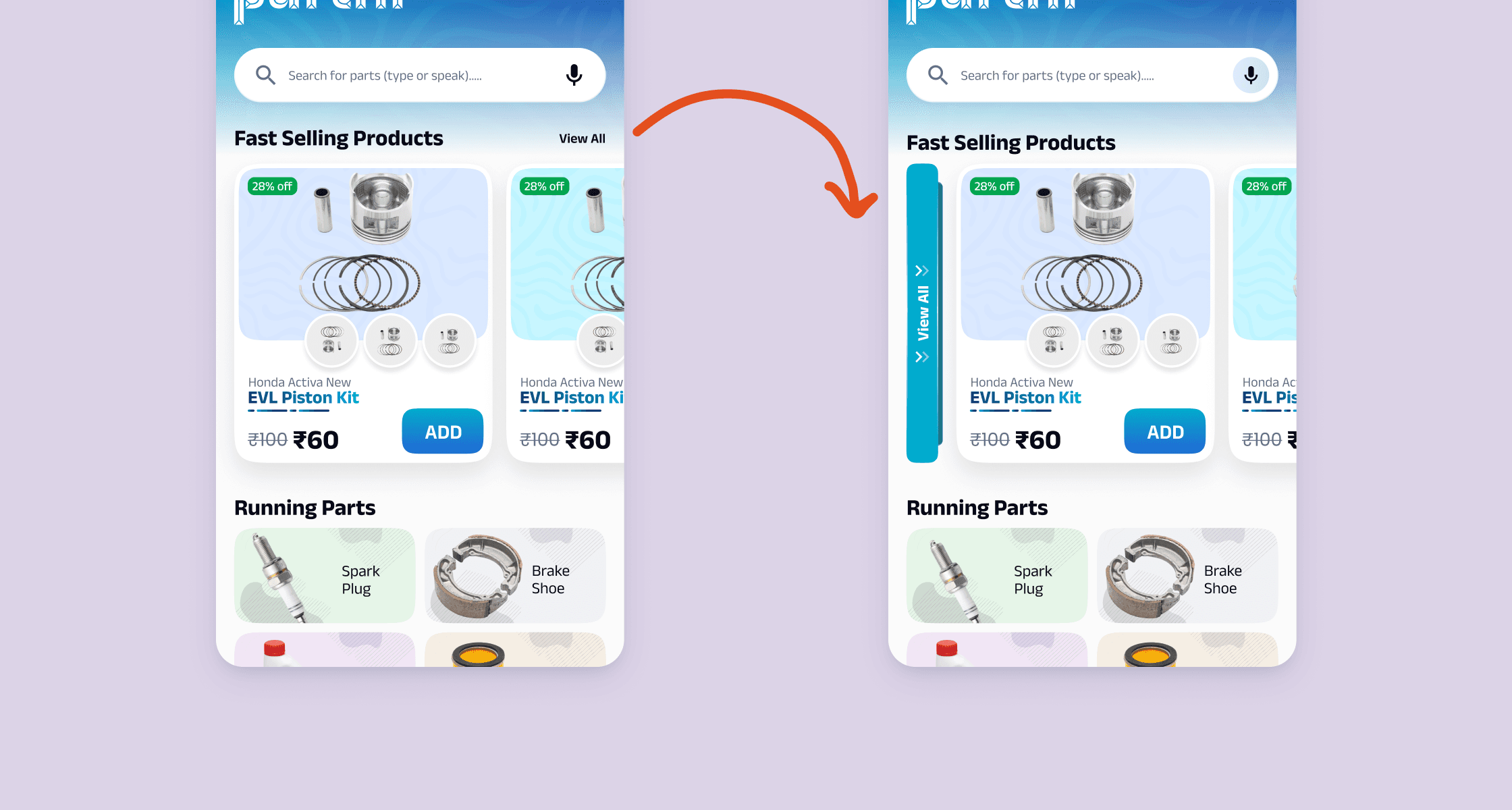
I moved the "View All" button from a small text link at the top right to a large vertical sticky tab on the left side of the section, so mechanics could actually get to the full listing without hunting for it.
I moved the "View All" button from a small text link at the top right to a large vertical sticky tab on the left side of the section, so mechanics could actually get to the full listing without hunting for it.
I moved the "View All" button from a small text link at the top right to a large vertical sticky tab on the left side of the section, so mechanics could actually get to the full listing without hunting for it.
More context
The click rate on Fast Selling Products was really low. Users were missing the View All link tucked in the corner.
The problem was two things at once. The CTA was too small to notice and horizontal scroll gave no reason to think there was more worth exploring. Making it vertical, large and always visible changed that. It became part of the browsing experience rather than something you had to hunt for.
Click rate on the section went up by 31%.
UX Psychology
This is about affordance. A sticky vertical tab signals "there is more here" passively, without the user having to read anything or make a decision to look for it.
UX Bites
Nobody has time to read every designer's case study, so I'm not writing one. Just real UX decisions from real projects, no fluff, no BS — and if something clicks, we can discuss in detail.
1.
Banner strip
I replaced the horizontal banner carousel with a thumbnail strip on the right. Tap any thumbnail, and it expands on the left, no swiping needed.
I replaced the horizontal banner carousel with a thumbnail strip on the right. Tap any thumbnail, and it expands on the left, no swiping needed.
I replaced the horizontal banner carousel with a thumbnail strip on the right. Tap any thumbnail, and it expands on the left, no swiping needed.
More context
With a carousel, most users never go past the first banner.
The thumbnail strip makes the full set visible upfront. Mechanics started noticing offers they would have completely missed before banner taps went up by +22% and contributed to a +1.1% GMV bump.
UX Psychology
This leans on the Von Restorff effect. When all options are visible at once, each one has a fair chance of standing out, rather than only the first getting all the attention.
2.
The icon nobody could find
Mechanics have chaotic home screens, Partnr's app icon was buried in there with dozens of others. I replaced it with a home screen widget
Mechanics have chaotic home screens, Partnr's app icon was buried in there with dozens of others. I replaced it with a home screen widget
Mechanics have chaotic home screens, Partnr's app icon was buried in there with dozens of others. I replaced it with a home screen widget
More context
For mechanics, finding the app icon was a conscious effort, dozens of icons, all roughly the same size and shape, competing for the same attention.
The widget skipped that entirely. It showed live part prices, right there on the home screen without them opening anything. Partnr went from something they had to find, to something they couldn't ignore.
Retention improved by +14% and GMV grew by +2.4%.
UX Psychology
This is the mere exposure effect at work. The more you see something, the more familiar and trustworthy it feels.
3.
Scan, don't search
I designed bike specific barcode sheets and placed them inside mechanic workshops. Scanning any barcode through the Partnr app instantly adds that part to the cart, ready to order in seconds.
I designed bike specific barcode sheets and placed them inside mechanic workshops. Scanning any barcode through the Partnr app instantly adds that part to the cart, ready to order in seconds.
I designed bike specific barcode sheets and placed them inside mechanic workshops. Scanning any barcode through the Partnr app instantly adds that part to the cart, ready to order in seconds.
More context
During research I found that most mechanics work on one or two specific bike models depending on their area. They know exactly which parts they need and were just calling their supplier to place orders.
The barcode sheet matched that mental model. It lived on their workshop wall, always visible, with every frequently needed part right there. No searching through the app, no scrolling through categories, just scan and confirm.
Order time reduced by -18% and GMV grew by +8.6%.
UX Psychology
This is reducing cognitive load by removing the need to recall and search. The sheet did the memory work for them, mechanics just had to point and scan.
4.
CTA hiding in plain sight
I moved the "View All" button from a small text link at the top right to a large vertical sticky tab on the left side of the section, so mechanics could actually get to the full listing without hunting for it.
I moved the "View All" button from a small text link at the top right to a large vertical sticky tab on the left side of the section, so mechanics could actually get to the full listing without hunting for it.
I moved the "View All" button from a small text link at the top right to a large vertical sticky tab on the left side of the section, so mechanics could actually get to the full listing without hunting for it.
More context
The click rate on Fast Selling Products was really low. Users were missing the View All link tucked in the corner.
The problem was two things at once. The CTA was too small to notice and horizontal scroll gave no reason to think there was more worth exploring. Making it vertical, large and always visible changed that. It became part of the browsing experience rather than something you had to hunt for.
Click rate on the section went up by 31%.
UX Psychology
This is about affordance. A sticky vertical tab signals "there is more here" passively, without the user having to read anything or make a decision to look for it.
UX Bites
Nobody has time to read every designer's case study, so I'm not writing one. Just real UX decisions from real projects, no fluff, no BS — and if something clicks, we can discuss in detail.
1.
Banner strip
I replaced the horizontal banner carousel with a thumbnail strip on the right. Tap any thumbnail, and it expands on the left, no swiping needed.
I replaced the horizontal banner carousel with a thumbnail strip on the right. Tap any thumbnail, and it expands on the left, no swiping needed.
I replaced the horizontal banner carousel with a thumbnail strip on the right. Tap any thumbnail, and it expands on the left, no swiping needed.
More context
With a carousel, most users never go past the first banner.
The thumbnail strip makes the full set visible upfront. Mechanics started noticing offers they would have completely missed before banner taps went up by +22% and contributed to a +1.1% GMV bump.
UX Psychology
This leans on the Von Restorff effect. When all options are visible at once, each one has a fair chance of standing out, rather than only the first getting all the attention.
2.
The icon nobody could find
Mechanics have chaotic home screens, Partnr's app icon was buried in there with dozens of others. I replaced it with a home screen widget
Mechanics have chaotic home screens, Partnr's app icon was buried in there with dozens of others. I replaced it with a home screen widget
Mechanics have chaotic home screens, Partnr's app icon was buried in there with dozens of others. I replaced it with a home screen widget
More context
For mechanics, finding the app icon was a conscious effort, dozens of icons, all roughly the same size and shape, competing for the same attention.
The widget skipped that entirely. It showed live part prices, right there on the home screen without them opening anything. Partnr went from something they had to find, to something they couldn't ignore.
Retention improved by +14% and GMV grew by +2.4%.
UX Psychology
This is the mere exposure effect at work. The more you see something, the more familiar and trustworthy it feels.
3.
Scan, don't search
I designed bike specific barcode sheets and placed them inside mechanic workshops. Scanning any barcode through the Partnr app instantly adds that part to the cart, ready to order in seconds.
I designed bike specific barcode sheets and placed them inside mechanic workshops. Scanning any barcode through the Partnr app instantly adds that part to the cart, ready to order in seconds.
I designed bike specific barcode sheets and placed them inside mechanic workshops. Scanning any barcode through the Partnr app instantly adds that part to the cart, ready to order in seconds.
More context
During research I found that most mechanics work on one or two specific bike models depending on their area. They know exactly which parts they need and were just calling their supplier to place orders.
The barcode sheet matched that mental model. It lived on their workshop wall, always visible, with every frequently needed part right there. No searching through the app, no scrolling through categories, just scan and confirm.
Order time reduced by -18% and GMV grew by +8.6%.
UX Psychology
This is reducing cognitive load by removing the need to recall and search. The sheet did the memory work for them, mechanics just had to point and scan.
4.
CTA hiding in plain sight
I moved the "View All" button from a small text link at the top right to a large vertical sticky tab on the left side of the section, so mechanics could actually get to the full listing without hunting for it.
I moved the "View All" button from a small text link at the top right to a large vertical sticky tab on the left side of the section, so mechanics could actually get to the full listing without hunting for it.
I moved the "View All" button from a small text link at the top right to a large vertical sticky tab on the left side of the section, so mechanics could actually get to the full listing without hunting for it.
More context
The click rate on Fast Selling Products was really low. Users were missing the View All link tucked in the corner.
The problem was two things at once. The CTA was too small to notice and horizontal scroll gave no reason to think there was more worth exploring. Making it vertical, large and always visible changed that. It became part of the browsing experience rather than something you had to hunt for.
Click rate on the section went up by 31%.
UX Psychology
This is about affordance. A sticky vertical tab signals "there is more here" passively, without the user having to read anything or make a decision to look for it.